
Every season it starts the same way: someone offers to run the tipping competition, builds a spreadsheet, and spends every Monday chasing tips in the group chat and adding up points by hand. By round six, the spreadsheet has three versions and nobody trusts the totals.
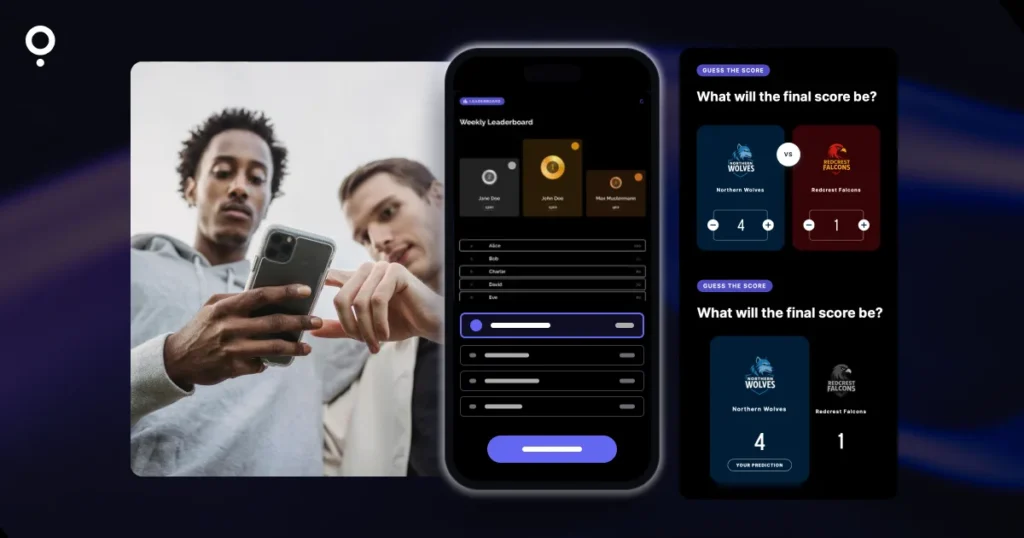
There is an easier way. This guide shows how to run a free tipping competition for your club, office or group of friends with a predictor for each round and one leaderboard that ranks everyone across the whole season. Players enter their tips on their phone, the points are calculated for them, and the standings update without a spreadsheet.
The short answer
- Use a predictor for the tips. In Qzzr, a predictor lets players guess the score or pick the winner of each game.
- Use a leaderboard for the season. Connect every round’s predictor to the same leaderboard and it ranks players across all rounds.
- Keep entry simple. Players can join with just a nickname, no account and no email if you prefer.
- Start free. Qzzr’s free plan has every feature, no time limit and 300 completions in total. A bigger comp moves to Pro at $9/month, billed monthly.
Tipping comp vs. leaderboard: what’s the difference?
The two words often get mixed up, but they describe two different parts of the same game.
- The tipping is the prediction itself: who wins this weekend’s games, and in some comps, by how much. Depending on where you live you may call it tipping, a prediction pool or pick’em.
- The leaderboard is the running table. It adds up each player’s points round after round and shows who is on top.
A spreadsheet can do both, but only if someone types in every tip and every result. A tool that handles both parts takes that job away: players submit their own tips, you enter the real results once, and the leaderboard does the math.
What a free tipping competition tool needs to do
Before you pick a tool, check it against the things that make or break a season-long comp:
| Requirement | Why it matters | How Qzzr handles it |
|---|---|---|
| Score and winner tips | Some comps only pick winners, others reward the exact score. | Two predictor blocks: Guess the Score and Pick the Winner (with an optional Tie option). |
| A season table | Players want to see the standings after every round. | One leaderboard connected to several predictors, as a cumulative season table. |
| Flexible scoring | An exact score should be worth more than just the right winner. | You set points for exact prediction, right difference, right tendency and wrong. |
| Easy entry | Every extra step costs you players. | Nickname-only entry possible; email verification is off by default. |
| Fair play | Nobody should change a tip after kickoff. | Only the first submitted prediction counts, and games with a result entered can’t be tipped. |
| Sharing | The comp has to live where your members already are. | Embed on your website or share a landing page link or QR code. |
How to set up a tipping competition in Qzzr
The setup that works best for a season is simple: one predictor per round, one leaderboard for the whole season. Here are the steps.
1. Build the first round’s predictor
In the Creator, click CREATE Q, choose Predictor and start from scratch. Add one block per game:
- Guess the Score shows two teams side by side, and players enter the score they expect for each.
- Pick the Winner shows two teams with a CHOOSE button under each. The Tie option is on by default, so players can also predict a draw.
You can mix both blocks in one round and add the team logos. Transparent PNG or SVG files look best.
2. Decide how many points each tip is worth
Under CONFIGURE RESULTS you set the points for four outcomes:
- Exact prediction: the player guessed the exact score.
- Right difference: the right winner and the right margin.
- Right tendency: the right winner.
- Wrong: wrong winner and wrong score.
A common choice is a sliding scale such as 4, 3, 2 and 0 points, so a bold exact-score tip pays off without making the right winner worthless. If your comp only picks winners, the right tendency is what counts.
3. Create the season leaderboard
Publish the predictor, then create a Leaderboard and connect the predictor to it. Qzzr’s help describes exactly this use: weekly, monthly or ongoing cumulative leaderboards that connect different Qs. Under Settings you choose how players enter:
- Nickname only: switch off “Require email” for an arcade-style table.
- Name and email: keep the email if you want to contact winners, and add OTP verification if you need it. It is off by default for new leaderboards.
- Bad word filter: block rude nicknames with the built-in list and add your own terms.
You can also show the top three as a podium (gold, silver and bronze by default, or your club colors) or as compact rows.
4. Enter the results after each game
After the games, open the predictor, go to Publish and click Enter correct results. You can enter results game by game while others are still to come. Points are awarded once the results are in. Then republish the predictor and the leaderboard, and the standings update.
5. Add next round’s predictor
Save round one as a template so each new round only needs new teams. Publish the next predictor and connect it to the same leaderboard. One detail to remember: a leaderboard only counts plays that happen after a Q is connected, so connect each new round before you share it.
Keeping your tipping competition fair
Arguments over late tips kill more comps than bad luck. Two rules in Qzzr help here:
- First tip counts. For predictors, the first submitted prediction is the one that scores. Playing again doesn’t overwrite it.
- No tipping after the result. Once you enter a game’s result, players can no longer make a prediction for that game. They see the final result instead.
Tell your players both rules at the start of the season and you avoid most of the Monday-morning disputes.
Sharing it on your club website, in chats and at the clubhouse
Each predictor and the leaderboard get their own landing page, so you can post a link in the group chat or put a QR code on the clubhouse noticeboard without a website at all. If you have one, embed the leaderboard on its own page and each round’s predictor in your match preview. The embed code works on WordPress, Wix and other site builders without a plugin. Our guide to the best quiz tool for WordPress covers the details.
If you collect emails, an automated result email can go out after each round’s tips, also on the free plan. Prefer a newsletter? Native integrations send entries to Mailchimp, ActiveCampaign, AWeber or Brevo, and a webhook connects to Zapier. Here is how quizzes grow an email list.
Keeping a season comp GDPR-compliant
A tipping comp for a club or office collects personal data the moment you ask for names and emails. The simplest fix is to ask for less: with nickname-only entry, players don’t hand over an email at all.
Qzzr is EU-based and GDPR/CCPA compliant by default. IP addresses are only stored as hashes, and a data processing agreement is available. If you do collect emails, for example to send prizes, you can add double opt-in and say clearly in the form what the email is used for.
What a full season costs
Qzzr’s free plan is free forever with no time limit and no credit card. It includes every feature, predictors and leaderboards included, and 300 completions in total. That total does not reset each month.
Each player who submits a round’s tips uses a completion, so a quick estimate is players x rounds. Twelve friends over a 20-round season need about 240 completions and fit on the free plan. A club with 50 members tipping every week needs more, and the Pro plan is $9/month, billed monthly, for 1,000 completions per month. You can cancel at the end of any monthly period, so you only pay during the season. If you run out on the free plan, your content is paused, not deleted. The same pay-only-while-it-runs idea is behind our post on a quiz maker for a one-time event.
When Qzzr Isn’t the Right Fit
Qzzr is built for clubs, offices and small organizations. Be honest with yourself about these points:
- You enter the results. Qzzr doesn’t fill in match results for you. Someone has to enter them after each round.
- Qzzr branding stays. You can add your club logo and footer text, but the Qzzr branding can’t be removed on any plan.
- Tips can’t be changed. The first submitted prediction counts. Great for fairness, less great if your players like to change their minds.
If you run fan competitions for a professional team or a media brand and need white-label branding, look at Riddle, the enterprise quiz maker from the team behind Qzzr.
FAQ
What is the best free tool for a tipping competition?
Look for a tool that handles both the tips and the season table. Qzzr does both on its free plan: a predictor per round for the tips and one leaderboard that ranks players across all rounds, with 300 completions in total and no time limit.
Can players join without creating an account?
Yes. Players don’t need a Qzzr account. You can switch off the email requirement so they only enter a nickname, and email verification is off by default for new leaderboards.
How does the leaderboard add up points over a season?
Connect every round’s predictor to the same leaderboard. You set the points for an exact prediction, the right difference, the right winner and a wrong tip, and points are awarded once you enter the real results.
Can I embed the leaderboard on my club website?
Yes. The leaderboard and each predictor can be embedded on WordPress, Wix and other site builders without a plugin, or shared by link and QR code through their own landing pages.
Can players change their tips?
No. For predictors, the first submitted prediction counts. Once you enter a game’s result, that game can no longer be tipped.
Ready for kickoff? Build round one on the free plan, connect it to a leaderboard and send the link to your group before the first game.