
TL;DR: Quiz email marketing does two things at once. It grows your list at 41.4% opt-in rates vs 1.9% for pop-ups. And it tells you exactly who each subscriber is – so your emails stop being generic blasts and start being relevant from day one. Build it free in Qzzr. No external tools needed to get started.
What is quiz email marketing?
Simple idea. Two steps.
Step one: build a quiz with a lead form – also called an email list quiz or interactive opt-in – and collect emails from people who actually want to hear from you.
Step two: use what the quiz told you about each person to send them emails that are actually relevant.
Most businesses nail step one and completely ignore step two. They collect the emails. Then they send the same welcome sequence to everyone. The Super Fan gets the same email as the budget buyer. The beginner gets the same email as the expert.
You already have the data. You’re just not using it.
hat’s the gap. This guide closes it. With Qzzr’s free quiz maker, you can collect leads, automate the first email, and connect to your email tool – all without leaving the platform.
Two ways it makes your email marketing better
Quizzes grow your list faster.
41.4% opt-in rate. That’s what a quiz lead form converts at. A standard pop-up? 1.9%.
The reason is simple. The form appears right before the result – at the exact moment someone most wants what comes next. They hand over their email because they want their result. Not because you chased them.
Quiz answers make your emails relevant.
Every question answered is a data point. Budget. Commitment level. Priorities. Situation. That information gets attached to the email address. Your follow-up emails can speak directly to who that person is – not who you hope they might be.
Relevant emails get opened. Generic emails get ignored. Quizzes give you the data to be relevant from the very first send.
The numbers
| Metric | Result |
|---|---|
| Quiz opt-in rate vs. pop-ups | 41.4% vs. 1.9% (Riddle 2025 Quiz Marketing Report) |
| Average quiz completion rate | 73.4% |
| Segmented email open rates vs. non-segmented | 14.31% higher (Mailchimp) |
| Segmented campaign click rate vs. non-segmented | 100.95% higher (Mailchimp) |
| Engagement vs. standard web pages | 3.02x more |
That click rate stat. Segmented emails – different messages for different subscribers – get double the clicks of non-segmented sends. A quiz gives you the segmentation data automatically, as part of the opt-in. No extra work.
Live example: the ticket package quiz
A sports club. Four ticket packages. Five questions about attendance habits, seating preferences, perks, budget, and commitment level.
The quiz recommends one of four packages: The Ultimate Fan Experience, The Balanced Bundle, The Budget-Friendly Option, or The Flexi-Ticket.
[Embed: https://qzzr.com/view/ISt6Gh3Z]
See the lead form. “Want to receive fans-only offers?” Appears before the result. Collects first name, last name, and email. The fan opts in because they want their result. The club gets a lead already tagged with a ticket preference.
The Super Fan gets an email about premium season packages. The Flexi-Ticket person gets an email about pay-per-match options. Same club. Same email tool. Completely different messages. Because the quiz told them exactly who they were talking to.
That’s quiz email marketing. Right there.
Part 1: grow your list with a quiz
Nobody signs up for a newsletter because they feel like it. They sign up because there’s something on the other side worth having.
A quiz gives them that. They’ve answered five questions. They want their result. The lead form appears right before it. Sharing their email is the obvious next move.
Three things make quiz opt-ins convert:
Timing. Between the last question and the result. Not before question one (too cold). Not after the result (too late). The moment of maximum curiosity. That’s when the form shows up.
The offer. “Want to receive fans-only offers?” is specific. Valuable. Directly tied to the quiz. Not “sign up for updates.” Never “sign up for updates.”
Optional, not forced. Qzzr lets you make the form optional. Counter-intuitive. But it works. Optional forms with a strong offer build higher-quality lists than forced gates. People who opt in actually want to hear from you. That’s the list that converts.
What to collect:
Name and email. That’s it. The quiz answers are your real data. Don’t add phone number, job title, or company size to the form – every extra field kills completions. The quiz collects the context. The form collects the contact. Keep them separate.
Part 2: use quiz data to send better emails
This is the part most people skip. Don’t skip it.
Every answer in the quiz is a segmentation signal. Someone who said “I’m willing to pay a premium for the best experience” and “I want a multi-year package” is not the same lead as someone who said “I’m on a tight budget” and “No long-term commitment.”
They need different emails. Different subject lines. Different offers. Different tone.
How to do it:
Tag each lead with their quiz result. Qzzr sends the result alongside the email address to Mailchimp, ActiveCampaign, Brevo, AWeber, and Google Sheets. Your email tool uses that tag to trigger the right sequence automatically.
Four results. Four tags. Four email sequences. Each one starts with a subject line that references their result. Each one links to the specific product or package recommended – not a generic homepage.
One rule. If someone told you something in the quiz, use it in the email. If you don’t use it, you wasted the quiz.
What comes after the first email:
The first automated email confirms the result and delivers the CTA. The second email, sent two to three days later, goes deeper – address the specific concern that person’s result revealed. The Super Fan wants to know about early access and exclusive perks. The Budget buyer wants reassurance that the value is real. The third email is a nudge with urgency: a deadline, a limited offer, or social proof from people with the same result who acted.
Three emails. Each one built on what the quiz already told you. That’s the quiz lead nurture sequence. Short, relevant, and far more likely to convert than a generic welcome flow.
How to set up email automation in Qzzr: step by step
No Mailchimp needed. No external tool. Qzzr sends the first email automatically the moment someone submits their details.
Set it up once. It runs without you.
Step 1: Publish your quiz.
Go to Publish. Confirm the status shows Published.
Step 2: Click Email Automation.
Left sidebar, under Data / Leads.
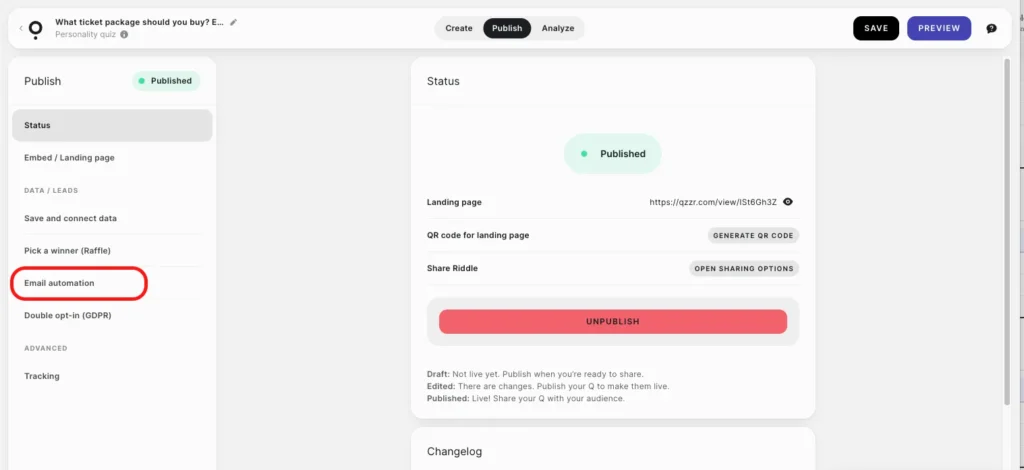
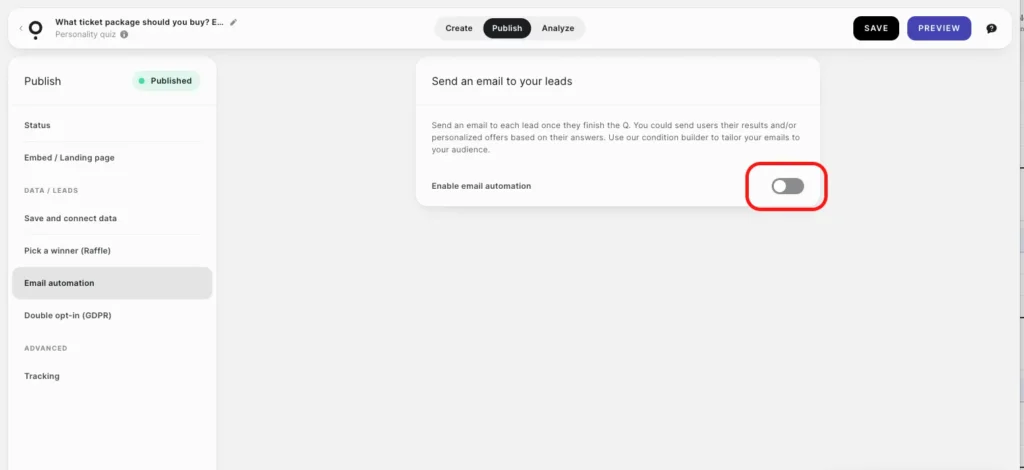
Step 3: Toggle on Enable email automation.
The email builder appears.
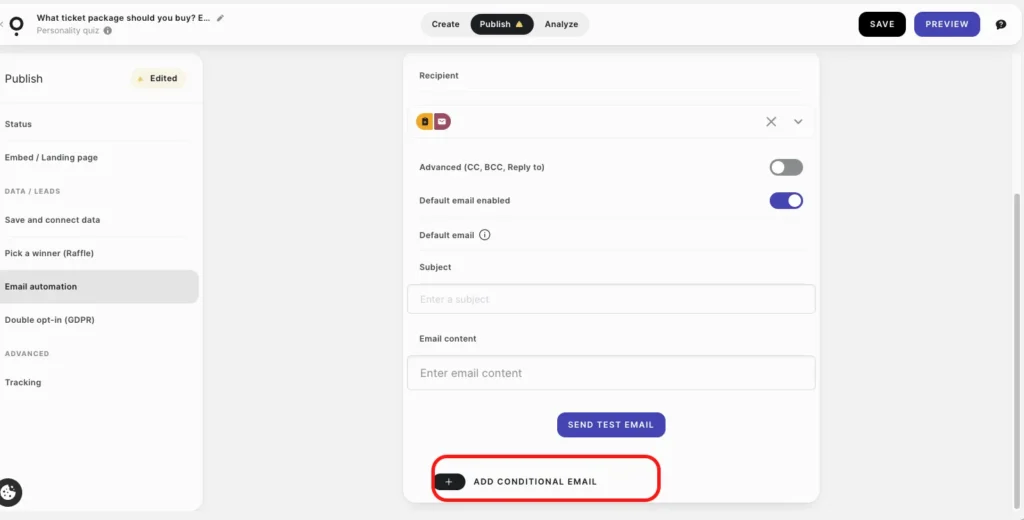
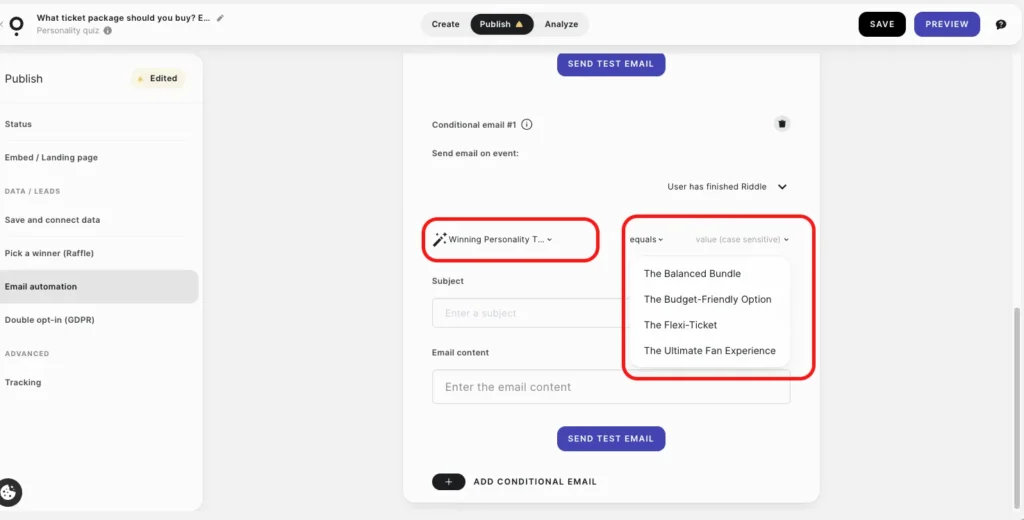
Step 5: Select Add Conditional Email
Click “Add condition.” Set the condition based on “Winning Personality: if result equals [Personality Type] – send this email. Repeat for each result. This is what turns a generic confirmation into a relevant, result-specific message.
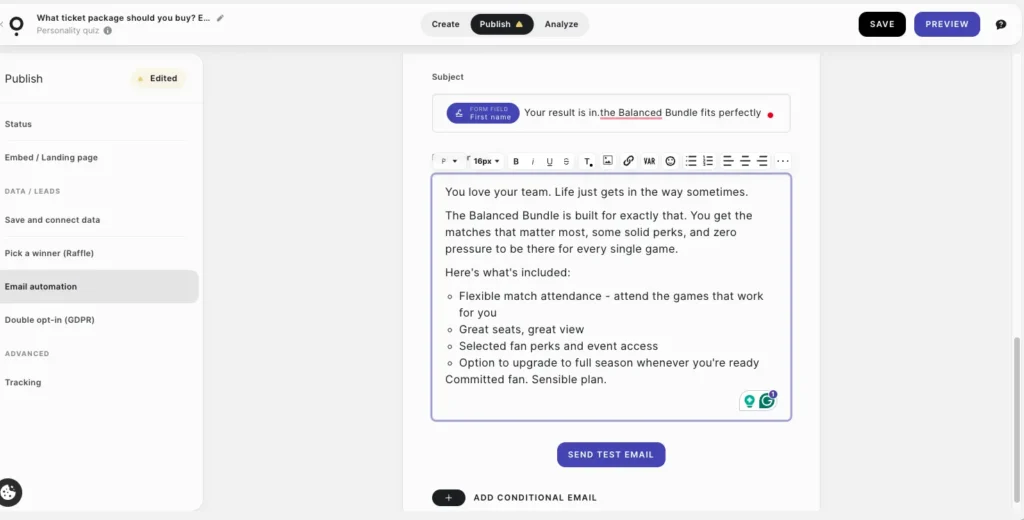
Step 4: Write your email.
Fill in the subject line, sender name, and email body. Keep it short. The quiz already did the heavy lifting.
Step 6: Save and test.
Take the quiz yourself. Reach each result. Confirm the right email fires. Check every link. Then go live.
Done. Every lead gets an automated result-specific email from Qzzr, the moment they opt in.
Email automation: what to send after the quiz
The quiz did the selling. The email confirms and converts.
Keep it short. One subject line that references their result. Two or three sentences that confirm the recommendation and why it fits. One CTA that goes directly to the product – not a general page.
Use Qzzr’s condition builder to send a different email per result. The Super Fan gets one message. The Flexi-Ticket person gets another. Each one feels personal because it is – it’s based on what that specific person told you.
No templates here. You know your product and your audience better than anyone. Write the email you’d want to receive if you’d just taken the quiz and got that result.
Connecting Qzzr to your email tool
Already on Mailchimp? ActiveCampaign? Brevo? Connect directly from the Qzzr dashboard.
Go to Publish, then Save and connect data, then Connect to integrations.
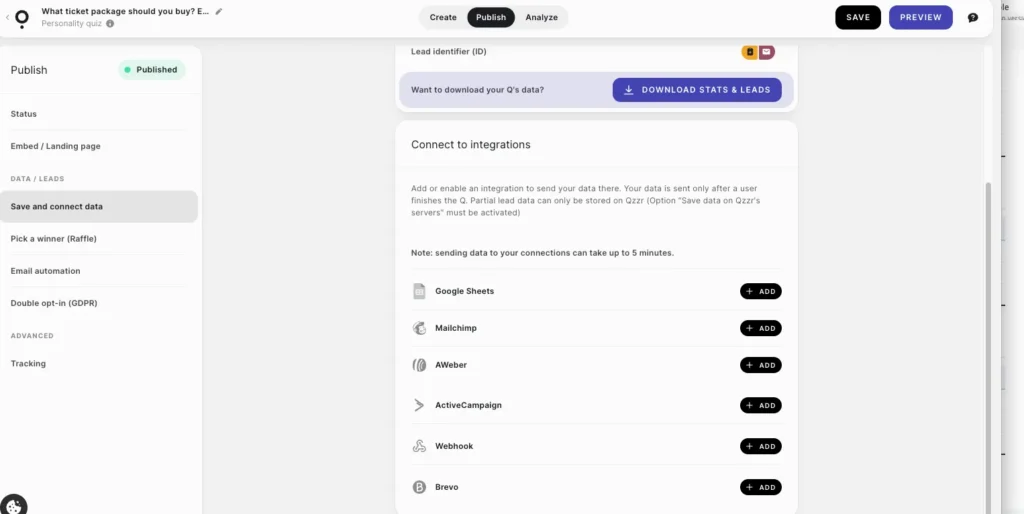
Available integrations: Google Sheets, Mailchimp, AWeber, ActiveCampaign, Brevo, and Webhook for everything else.
Leads flow automatically once the quiz is completed. Quiz result, name, email, and individual question answers – all sent to your platform, ready to segment on.
Which tool to use:
Mailchimp – simple sequences, tags work natively, good for most small businesses.
ActiveCampaign – advanced automation, lead scoring, conditional sequences.
Brevo – email and SMS in one place, low cost.
AWeber – simple, reliable, built for coaches and solo operators.
Google Sheets – manual export or feeding into another system.
Webhook – custom setups, anything not on the list.
Common mistakes to avoid
Not tagging leads by result. The most common failure. You lose everything the quiz built. Tag every lead before the first email goes out. Non-negotiable.
Same email to every result. The person took your quiz. They know you have their answers. If your follow-up ignores all of that, they notice. And they unsubscribe.
Waiting too long. Quiz leads go cold fast. Five minutes is the window. Qzzr’s automation fires immediately. If you’re using an external tool, set the welcome trigger to fire on list join – not on a schedule.
Over-building before you have volume. One well-written result-specific email beats a 10-step sequence built before anyone’s taken the quiz. Start with the single automated email. Add steps once you know which results convert.
Weak subject lines. “Thank you for taking our quiz” gets ignored. “Your result is in, [First Name]” gets opened. Reference the result. Make it feel personal. Because it is.
Not testing the conditions. Take the quiz yourself and reach every result before going live. One wrong condition sends the wrong email to the wrong person. Test everything.
How Qzzr handles quiz email marketing
Everything in one place. No extra tools to get started.
Qzzr’s free quiz maker includes:
- Built-in lead form with name, email, and custom fields
- Native email automation – send result-specific emails directly from Qzzr
- Condition builder – different emails per quiz result
- GDPR-compliant data storage on European servers
- Download leads as CSV any time
- Native integrations: Mailchimp, AWeber, ActiveCampaign, Brevo, Google Sheets
- Webhook for everything else
Free plan: 300 completions, full features, no credit card. After that, $9 a month for 1,000 completions. Need more? Add 1,000 for $5.
No fluff. No annoying upsells.
The ticket package quiz in this article runs entirely on Qzzr. Five questions, four result types, lead capture, automated result emails. Set up once. Runs without you.
Ready to set up your quiz email marketing?
Build your quiz free on Qzzr – no credit card, no locked features, 300 completions to start.
You asked. We answered.
What is quiz email marketing?
Using a quiz – sometimes called an email list quiz or interactive opt-in – to collect email subscribers and then sending those subscribers emails based on what their quiz answers revealed. Lead generation and email segmentation in a single step.
How does a quiz grow an email list?
The opt-in form appears right before the result – at peak curiosity. 41.4% of quiz takers who reach that point hand over their email. A standard pop-up gets 1.9%. Timing is everything.
Do I need Mailchimp to use quiz email marketing?
Nope. Qzzr has built-in email automation. Send result-specific emails directly from Qzzr, no external platform needed. If you already use Mailchimp, ActiveCampaign, Brevo, or AWeber, connect them natively and use Qzzr as the lead source.
What data does Qzzr send to my email tool?
Name, email, quiz result, and individual question answers. Segment on the top-level result or on specific answers. Your call.
How do I send different emails per result?
Qzzr’s condition builder in the Email Automation section. Set a condition per result type, assign a different email to each. Done. Every lead gets the email that matches their result, automatically.
Is this GDPR compliant?
Yes. Qzzr stores lead data on GDPR-compliant European servers. You control consent language, the privacy policy link, and data retention. Double opt-in is available under Double opt-in (GDPR) in the Publish panel.
Does Qzzr sell my data?
No. Never. Your data is yours only.
Can I download my quiz leads?
Yes. Publish, then Save and connect data, then Download Stats and Leads. CSV with everything – answers included.
Related reading
Quiz Lead Generation: How to Capture More Leads Without the Hard Sell
Quiz content marketing: how to create viral quizzes in 2026
How to create a product recommendation quiz that sells without selling (2026 guide)
Opt-in rate and engagement data from the Riddle 2025 Quiz Marketing Report, based on 3.13 billion quiz questions answered. Email segmentation data from Mailchimp’s Email Marketing Benchmarks Report.