
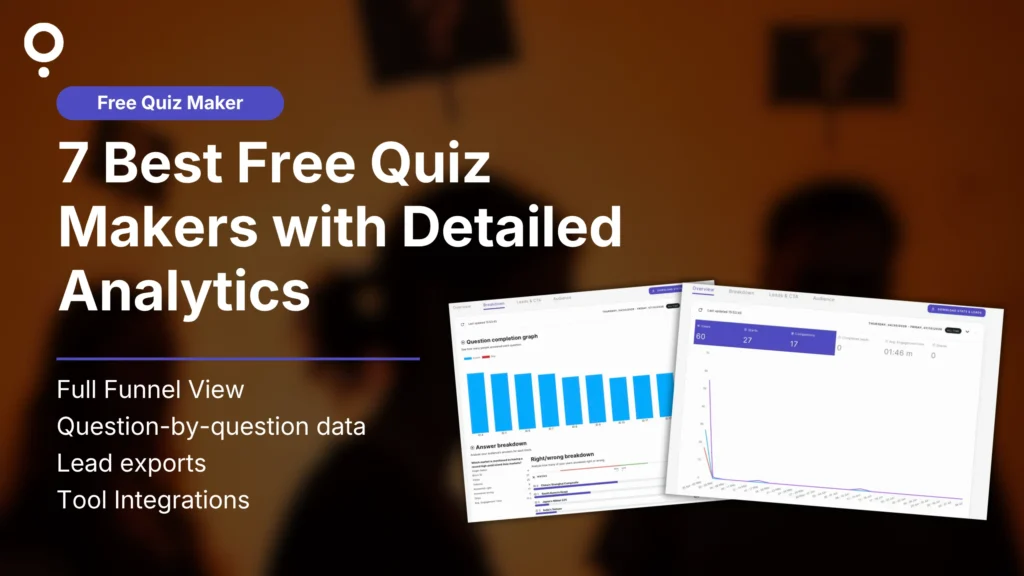
TL;DR: Most free quiz makers give you a response count and nothing else. Real analytics means seeing where people dropped off, which answers they picked, and where your leads came from, without paying first. Qzzr’s free plan includes full funnel tracking, per-question drop-off, right/wrong answer breakdowns, and native Google Analytics and Meta Pixel support. Most competitors lock at least one of those behind a paid tier, and one on this list has no analytics at all on its free plan.
What “detailed analytics” should actually mean
Before comparing tools, here’s what we mean by detailed. Best free quiz makers with real analytics should show you:
- The full funnel. Views, starts, completions, and leads, not just a final response count.
- Per-question drop-off. Which specific question people quit on, not just an overall completion rate.
- Answer-level breakdowns. What percentage picked each option, so you know where confusion happens, not just that it did.
- Exportable data. A way to get your own data out, on the free plan.
- Marketing integrations. Google Analytics or Meta Pixel support, so quiz data connects to the rest of your funnel.
Most of the 7 tools below hit one or two of these. Here’s exactly where each one stands.
Comparison at a glance
| Tool | What free analytics includes | Where it breaks down |
|---|---|---|
| Qzzr | Full funnel (views, starts, completions, leads), per-question completion graph, right/wrong breakdown per answer option, dedicated Leads & CTA tab, one-click CSV export, native Google Analytics and Meta Pixel support | Nothing above is paywalled |
| SurveyMonkey | View responses in-dashboard | No data export, no skip logic, capped at 25 responses per survey |
| Typeform | Basic response count | Question drop-off analysis and “Smart Insights” are paid-only features; capped at 10 responses/month total |
| Jotform | List of raw submissions, 1,000 monthly form views | No dedicated analytics dashboard, just a submission list; capped at 100 submissions/month |
| ProProfs Quiz Maker | Time spent, results, per-question answers, certificates | Capped at 8 questions per quiz on the free plan; shows ads |
| Interact | None | Free plan has no analytics (2 quizzes, 100 completions/month); paid plans from $39/month |
| Google Forms | Basic summary charts, per-question response counts | No drop-off or funnel view, no right/wrong percentage breakdown, no native GA or Meta Pixel tracking without manual setup |
Prices and free-plan limits last verified: October 2026, against each tool’s public pricing page and the independent reviews at quiz-maker-review.com.
Why Qzzr is the best free quiz maker for detailed analytics
Most “free” quiz makers show you a completion percentage and call it analytics. Qzzr’s free plan shows you where every single person dropped off, what they got right or wrong, and where they came from, all without upgrading.
What you actually see on the free plan:
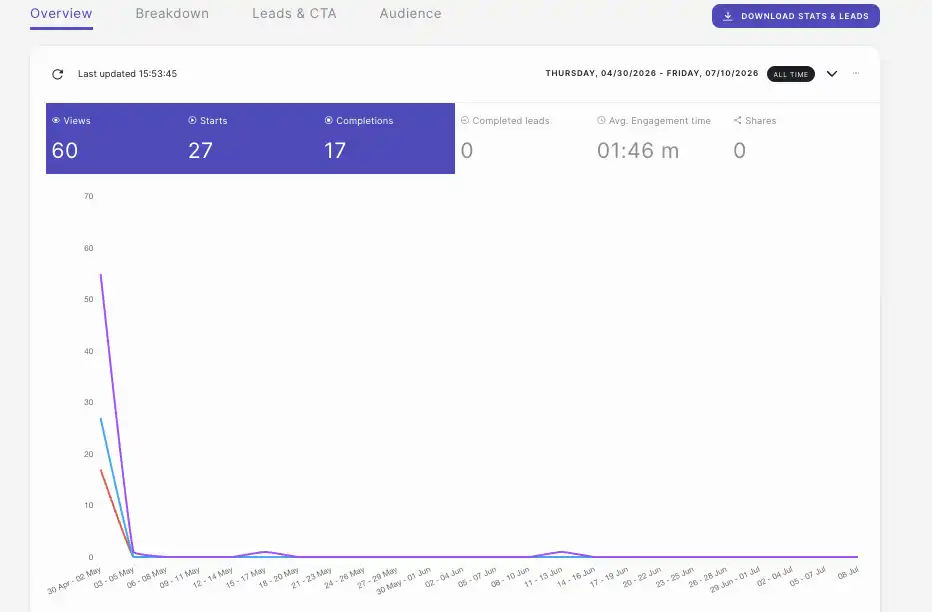
- Full funnel breakdown. Views, starts, completions, completed leads, shares, and average engagement time, tracked over any date range you choose.
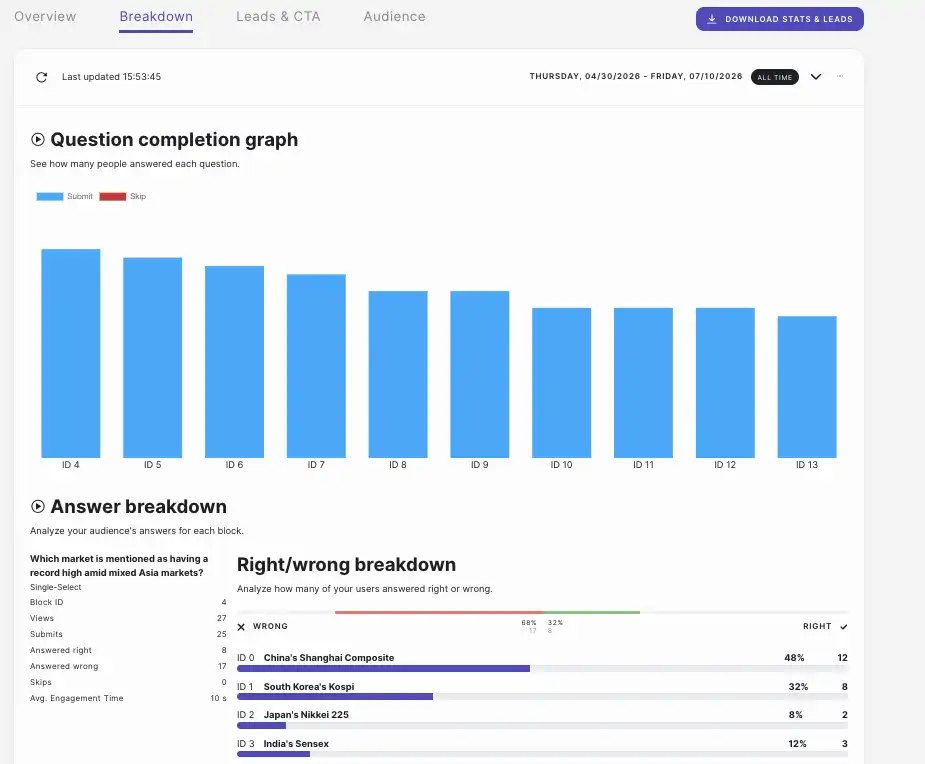
- Question-by-question completion data. A graph showing submits vs. skips for every question, so you know exactly where people give up, not just that some percentage did.
- Right/wrong answer breakdown. For every question, see the exact percentage and count of people who picked each answer option.
- A dedicated Leads & CTA tab. Separate from quiz performance, this tracks your lead form’s conversion funnel, breaks down performance by form field, and shows how your CTA buttons are actually performing.
- One-click export. Download all stats and leads as a CSV whenever you want.
- Google Analytics and Meta Pixel support. Connect both directly from the Publish tab to track custom events, a feature most competitors lock behind a paid plan.
- Six native integrations, no Zapier required. Google Sheets, Mailchimp, AWeber, ActiveCampaign, Webhook, and Brevo all connect in a couple of clicks.
That’s a genuinely deep analytics stack for a tool that costs nothing to start. See full pricing here.
SurveyMonkey
Pros: Strong brand recognition that respondents already trust, genuinely deep paid-tier analytics (crosstabs, benchmarks, an AI analysis suite), and hundreds of ready-made templates.
Free plan limitations:
- Capped at 25 responses per survey, and once you hit that, the 26th respondent sees a closed survey
- Capped at 10 questions per survey
- No data export at all, results are viewable only inside SurveyMonkey’s own dashboard
- No skip logic or branching
- SurveyMonkey branding can’t be removed
Cost to fix it: Paid plans start around $39/month billed annually (Advantage), or $149/month month-to-month (Standard).
Typeform
Pros: The best-looking, most conversational form experience on this list, which genuinely lifts completion rates, plus branching logic and calculated scores included even on the free plan.
Free plan limitations:
- Capped at 10 responses per month across your entire account, not per form
- Question drop-off analysis and “Smart Insights” are both paid-only
- Google Analytics and Meta Pixel integrations are paid-only
- Typeform branding can’t be removed
- No custom domains or premium themes
Cost to fix it: Basic plan starts at $39/month ($28/month billed annually) for 100 responses/month.
Jotform
Pros: A huge template library (10,000+), no cap on questions per form on any plan, and native support for payments and e-signatures most competitors here don’t offer at all.
Free plan limitations:
- Capped at 100 submissions per month across all forms
- Capped at 5 forms total
- 100MB storage limit
- Jotform branding on every form
- No dedicated analytics dashboard, “analytics” on the free tier is really just a raw submission list
Cost to fix it: Bronze plan starts at $34/month billed annually for 1,000 submissions/month.
ProProfs Quiz Maker
Pros: Genuinely solid reporting even on the free tier (time spent, results, per-question answers, certificates), a massive library of 100,000+ ready-made questions and templates, and automated grading built in.
Free plan limitations:
- Capped at 8 questions per quiz
- Ads shown throughout the quiz-taking experience
- Limited branding and customization options
- No cohort/group-level analytics without upgrading
Cost to fix it: Business plan starts around $20/month.
Interact
Pros: Deep integrations with 26+ email marketing platforms, purpose-built templates specifically for lead-gen quizzes, and strong analytics once you’re on a paid tier.
Free plan limitations:
- The free plan is limited to 2 quizzes and 100 completions per month, with no analytics
- The cheapest paid tier still caps you at 5 quizzes and 500 leads per month
- Advanced analytics, custom branding, and white-labeling are reserved for higher tiers
Cost to fix it: Starts at $39/month month-to-month, or $27/month billed annually, once the trial ends.
Google Forms
Pros: Completely free forever with no response cap of any kind, and it’s the easiest tool here to plug straight into Google Sheets for further analysis.
Free plan limitations:
- No funnel or drop-off view, you can’t see which question caused people to quit
- No right/wrong percentage breakdown per answer, just raw response counts
- No native Google Analytics or Meta Pixel event tracking without manual workarounds
- Minimal design customization and no branching logic beyond basic section skips
Cost to fix it: There isn’t a paid tier to fix this, Google Forms simply doesn’t offer deeper analytics at any price point.
Ready to see analytics that actually mean something? Build your first quiz free. Or explore the full quiz maker and AI quiz generator if you’re starting from a topic instead of a blank page. Check pricing if you’re ready to see what happens after your first 300 completions.
Got Questions?
What free quiz maker includes detailed analytics for user results?
Qzzr’s free plan includes full funnel tracking (views, starts, completions, leads), per-question drop-off graphs, and right/wrong answer breakdowns for every question, all without upgrading. Most competitors lock at least one of these behind a paid tier.
Which free quiz maker shows where people drop off in a quiz?
Qzzr’s Breakdown tab shows a completion graph for every individual question, so you can see exactly which question causes people to quit, not just an overall completion percentage.
Can I export quiz analytics and leads on a free plan?
On Qzzr, yes, a one-click “Download Stats & Leads” button exports everything as CSV. SurveyMonkey’s free plan does not allow data export at all.
Does any free quiz maker connect to Google Analytics or Meta Pixel?
Qzzr supports both directly from the Publish tab on the free plan. Typeform gates both integrations behind a paid plan, and Interact doesn’t have a free plan to test this on at all.
What’s the best free quiz maker overall, not just for analytics?
Qzzr, since the same free plan that includes detailed analytics also includes unlimited quizzes, 300 completions, full branding, and six native integrations, without a credit card. See the full quiz maker or generate one instantly with the AI quiz generator.